 Younès Benallal
Creating Powerful Chatbot Script: examples, tips, prompts
Some chatbots feel like talking to a wall, while others seem to read your mind. The secret lies in the script.
We'll explore chatbot script examples to craft conversations that engage users and drive results. We will transform your chatbot from a robotic responder to a conversational champion.
Chatbot Script Examples
A well-crafted script can make all the difference in chatbot performance. Let's explore practical examples that showcase how chatbots can be leveraged for various business objectives.
Chatbot Scripts for Increasing Sales
A chatbot can be your round-the-clock sales assistant. Here's an example designed to guide a potential customer towards a purchase:
Bot: Hi there! 👋 I noticed you're looking at our premium headphones. They're pretty amazing, right? Is there anything specific you'd like to know about them?

User: What's the battery life like?

Bot: Great question! Our premium headphones boast an impressive 30-hour battery life on a single charge. That's enough for a whole month of daily commutes! 🎧🔋

Would you like to know about any other features?

User: No, that's all I needed to know.

Bot: Awesome! Based on the battery life, these headphones sound perfect for you. Would you like to:
1. Add to cart
2. See customer reviews
3. Compare with other models

User: Add to cart

Bot: Excellent choice! I've added the premium headphones to your cart. 🛒✨ Would you like to:
1. Proceed to checkout
2. Continue shopping

User: Proceed to checkout

Bot: Great! I'm taking you to the checkout page now. Don't forget, we offer a 30-day money-back guarantee, so you can shop with confidence. Happy listening! 🎵
This script shows how a chatbot can provide relevant information, address customer queries, and guide them smoothly through the purchasing process. It's the perfect assistant for ecommerce businesses.
Chatbot Scripts for Automating Customer Service
Customer service automation can significantly reduce response times and improve customer satisfaction. Here's an example of handling a common customer service scenario:
Bot: Hello! Welcome to `{{Company Name}} customer support. How can I assist you today?

User: I haven't received my order yet.

Bot: I'm sorry to hear that. Let's look into this for you. Could you please provide your order number?

User: ORDER123456

Bot: Thank you. I've located your order (ORDER123456). It appears that your package was shipped on {{ShipDate}} and is currently in transit. The estimated delivery date is {{EstimatedDeliveryDate}}.

Would you like me to:
1. Provide tracking information
2. Update your delivery address
3. Connect you with a human agent for more details

User: Provide tracking information

Bot: Certainly! Here's your tracking information:

Carrier: {{Carrier}}
Tracking Number: {{TrackingNumber}}
Current Status: {{CurrentStatus}}
Last Updated: {{LastUpdated}}

You can click this link to view real-time updates: {{TrackingLink}}

Is there anything else I can help you with regarding your order?

User: No, that's all. Thanks!

Bot: You're welcome! I'm glad I could help. If you need any further assistance, don't hesitate to ask. Have a great day! 😊
This script demonstrates how a chatbot can efficiently handle order inquiries, provide relevant information, and offer options for further assistance.
Chatbot Scripts for Reducing Customer Support Workload
Chatbots can significantly reduce the workload on human customer support agents by handling frequently asked questions. Here's an example:
Bot: Hi there! I'm {{BotName}}, {{Company}}'s virtual assistant. How can I help you today?

User: How do I reset my password?

Bot: Resetting your password is easy! Here's a step-by-step guide:
1. Go to our login page
2. Click on "Forgot Password"
3. Enter the email address associated with your account
4. Check your email for a password reset link
5. Click the link and follow the instructions to set a new password
Would you like me to send you these instructions via email?
User: Yes, please.
Bot: Certainly! I've sent the password reset instructions to your registered email address. You should receive it shortly.
Is there anything else I can help you with?
User: No, that's all I needed.
Bot: Great! I'm glad I could assist you. If you need any further help, don't hesitate to ask. Have a wonderful day! 😊
Remember, for account security, never share your password with anyone, including our support team.This script demonstrates how a chatbot can efficiently handle a common support request, reducing the need for human intervention.
Chatbot Script Examples for Different Customer Journey Phases
Different stages of the customer journey require different approaches. Let's look at examples for the Awareness, Consideration, and Decision phases:
Awareness Phase
Bot: Hello! 👋 I noticed you're new here. Welcome to {{Company}}! We specialize in {{ProductCategory}}. What brings you to our site today?

User: Just browsing

Bot: Great! I'd be happy to help you explore our offerings. Are you looking for something specific, or would you like an overview of our most popular {{ProductCategory}}?

User: An overview would be nice

Bot: Fantastic! Here's a quick rundown of our top {{ProductCategory}}:

1. {{Product1}}: Best for {{Use Case1}}
2. {{Product2}}: Ideal for {{Use Case2}}
3. {{Product3}}: Perfect if you need {{Feature}}

Which one sounds most interesting to you?
Consideration Phase
Bot: Welcome back to {{Company}}! I see you've been checking out our {{ProductCategory}}. Have you found something you like?

User: I'm comparing your {{Product}} with competitors

Bot: That's a smart approach! To help you make an informed decision, here are some key advantages of our {{Product}}:

1. {{UniqueFeature1}}
2. {{UniqueFeature2}}
3. {{UniqueFeature3}}

Would you like me to elaborate on any of these features?

User: Tell me more about {{UniqueFeature2}}

Bot: Certainly! {{UniqueFeature2}} is...
Decision Phase
Bot: Hi there! I noticed you've added {{Product}} to your cart. Great choice! 🎉 Did you know that many customers also buy {{ComplementaryProduct}} to enhance their experience?

User: No, I didn't. Tell me more.

Bot: Absolutely! {{ComplementaryProduct}} pairs perfectly with {{Product}} because it {{Benefit}}. Plus, if you buy them together, you'll save {{DiscountAmount}}!

Would you like to:
1. Add {{ComplementaryProduct}} to your cart
2. Proceed to checkout with just {{Product}}
3. Learn more about {{ComplementaryProduct}}

User: I'll add it to my cart

Bot: Excellent decision! I've added {{ComplementaryProduct}} to your cart. Your total savings are now {{TotalSavings}}. Ready to complete your purchase?
These examples illustrate how chatbot scripts can be tailored to different stages of the customer journey. They provide relevant information and guide users towards a purchase decision.
How to Write Chatbot Scripts
Crafting effective chatbot scripts combines strategic planning, empathy, and a deep understanding of your audience. Let's dive into the key steps and considerations for writing chatbot scripts that engage users and achieve your business goals.
Identify Your Goals
Define what you want your chatbot to accomplish. Are you aiming to increase sales, provide customer support, or generate leads? Your goals will shape the structure and content of your scripts. For example:
- Sales goal: "Increase conversion rate by 15% for our new product line"
- Support goal: "Reduce customer service response time by 50%"
- Lead generation goal: "Collect qualified leads for our sales team with a 30% conversion rate"
Outline Your Customer Journey
Map out the typical path a customer takes when interacting with your brand. Identify key touchpoints where a chatbot could provide value. For instance:
- Awareness: Introduce products or services to new visitors
- Consideration: Provide detailed information and comparisons
- Decision: Offer promotions or address final concerns
- Post-purchase: Provide order tracking or gather feedback
By understanding this journey, you can create scripts that address user needs at each stage.
Hyper Personalization Using Variables
Personalization is key to creating engaging chatbot experiences. Use variables to customize your scripts. Here's how you can leverage this feature:
Bot: Welcome back, {{First name}}! 👋 I see you're interested in our {{Product}} again.
Last time, you mentioned you were looking for something with {{Feature}}.
Would you like to see our latest models that match this criteria?

User: Yes, please.

Bot: Great! Based on your preferences, I think you'll love these options:

1. {{Product A}} - It has {{Feature}} and also includes {{Additional Feature}}
2. {{Product B}} - This one takes {{Feature}} to the next level with {{Unique Selling Point}}

Which one would you like to explore further?
By using variables like {{First name}}, {{Product}}, and {{Feature}}, you create a highly personalized experience that makes users feel understood and valued.
You can pass data from the web page to the chatbot to add more personalization. It can be the profile of the connected user, the product the user is currently viewing, the error that just occured, ...
Add a Personal Touch and Stick to Your Brand Voice
Your chatbot should reflect your brand. Infuse your scripts with your brand's personality and tone. If your brand is playful, use emojis or casual language. If you're more formal, maintain a professional tone. For example:
Casual brand:
Bot: Hey there! 😎 Ready to find your perfect pair of kicks? Let's get this shoe party started! 🥳👟Professional brand:
Bot: Welcome to Premium Financial Services. How may I assist you with your investment portfolio today?
Use the Right Language for Emotional Appeal
Language can significantly impact how users feel about their interaction. Use positive, solution-oriented language to create a pleasant experience:
Bot: I understand you're having trouble with your order. Let's work together to resolve this quickly and get you back to enjoying your purchase. 😊
Focus on Brevity
Keep your chatbot's messages concise and to the point. Users prefer quick, easily digestible information. Break long messages into smaller chunks:
Instead of:
Bot: Our premium headphones offer superior sound quality with noise-cancelling technology, a comfortable over-ear design, and a long-lasting battery that can go for up to 30 hours on a single charge. They're perfect for music lovers, frequent travelers, or anyone who appreciates high-quality audio.Try:
Bot: Let me tell you about our premium headphones:
• Superior sound quality
• Noise-cancelling technology
• Comfortable over-ear design
• 30-hour battery life

They're ideal for:
• Music lovers
• Frequent travelers
• Audio enthusiasts

Which feature interests you most?
Implement User Feedback
Continuously improve your scripts based on user interactions and feedback. Follow this process:
- Collect data: Analyze chat logs and user feedback surveys.
- Identify pain points: Look for common issues or questions users struggle with.
- Refine scripts: Address these pain points in your chatbot responses.
- A/B test: Create multiple versions of scripts and see which performs better.
- Iterate: Continuously refine based on new data and feedback.
For example, if you notice many users asking about return policies, you might add a proactive message:
Bot: Before we proceed to checkout, would you like to know about our hassle-free 30-day return policy?By following these guidelines and continuously refining your approach, you can create chatbot scripts that not only serve your business goals but also provide a positive, helpful experience for your users.
Bonus: ChatGPT Prompt to Generate Chatbot Scripts
Leveraging AI to generate chatbot scripts can streamline your development process. Here's a prompt you can use with ChatGPT to create effective chatbot scripts:
As an AI chatbot script writer, create a conversation flow for a [type of business] chatbot. The main goal is to [specific objective]. Include the following elements:

1. A warm welcome message
2. 3-5 main user intents the chatbot should handle
3. Appropriate responses for each intent
4. Use of variables for personalization (e.g., `{{Name}}`, `{{Product}}`)
5. A mix of open-ended and multiple-choice questions
6. Conditional logic based on user responses
7. A friendly closing message

Ensure the tone is [desired tone] and aligns with [brand personality]. Limit each bot response to 2-3 sentences for readability.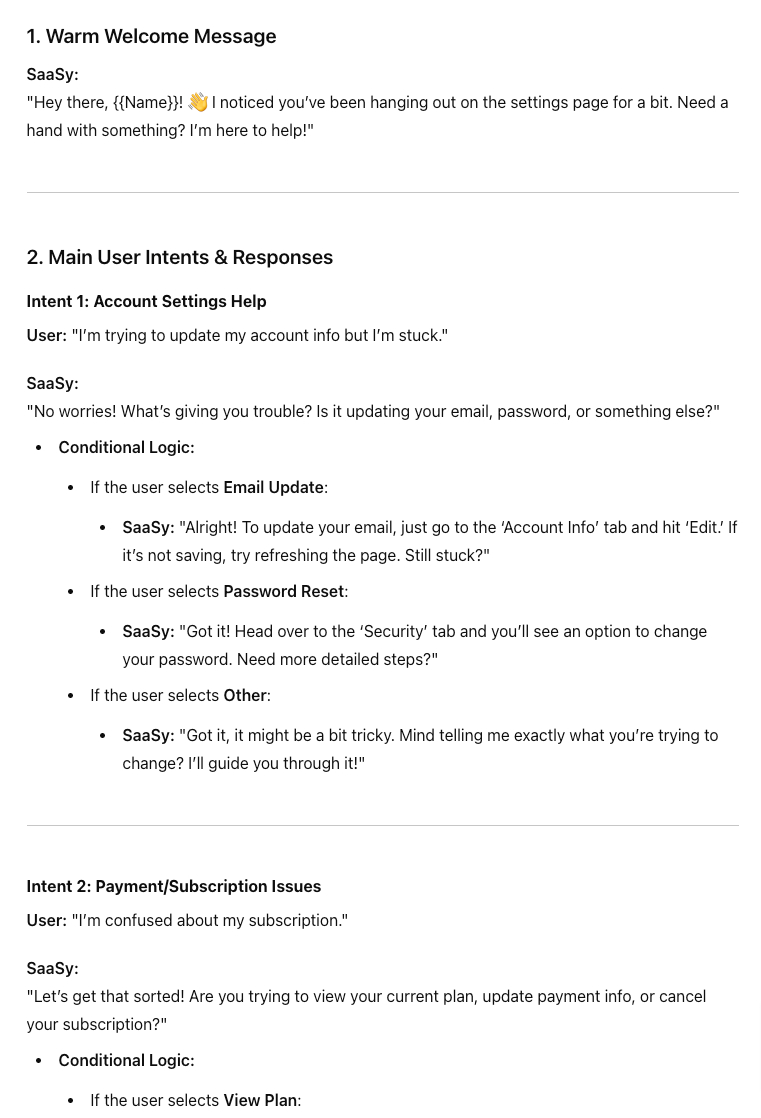
Looking to enhance your marketing efforts? Check out our collection of marketing prompts to create compelling chatbot scripts that drive engagement and conversions.
How to Use and Improve the Prompt with ChatGPT
-
Start with the base prompt above and run it through ChatGPT.
-
Review the generated script and identify areas for improvement. You might notice that:
- Some responses are too generic
- The flow doesn't quite match your brand voice
- Certain important questions or objections aren't addressed
-
Refine the prompt based on your observations. For example:
The script was good, but I need more emphasis on our unique selling points, which are [list USPs]. Also, please include a way for the chatbot to handle the common objection that [describe objection]. -
Run the refined prompt and review the new output.
-
Iterate this process, continually refining the prompt until you get a script that closely matches your needs.
-
Once you have a satisfactory base script, ask ChatGPT to generate variations or expand on specific parts of the conversation.
Remember, while AI can provide a great starting point, it's crucial to review and edit the scripts to ensure they align perfectly with your brand voice and business goals. Use the AI-generated scripts as a foundation, then customize and refine them to create truly effective chatbot conversations.
Building Chatbots with Typebot
Typebot offers a user-friendly platform for creating sophisticated chatbots without coding skills. Let's explore how you can leverage Typebot's features to build engaging and effective chatbots.
Introduction to Typebot's Drag-and-Drop Interface
Typebot's intuitive drag-and-drop interface makes chatbot creation accessible to users of all technical levels. The platform presents a visual flowchart-like structure where you can easily add, move, and connect different elements of your chatbot.
Key features include:
- A central workspace where you build your chatbot flow
- A sidebar with various blocks and elements you can drag into your flow
- Easy-to-use connectors to link different blocks and create conversation paths
- Real-time preview to test your chatbot as you build
Using Templates
Typebot provides a range of pre-built templates to jumpstart your chatbot creation process. These templates cover various use cases such as lead generation, customer support, and product recommendations.
Remember, templates are starting points. Tailor them to fit your specific needs and brand voice.
Step-by-Step Guide to Building Your First Chatbot with Typebot
Let's build the script ChatGPT suggested above. The user has spent a lot of time on our imaginary SAAS settings page. Let's help him:
-
Start a new project in Typebot.
-
Add a "Start" block to begin your flow.
-
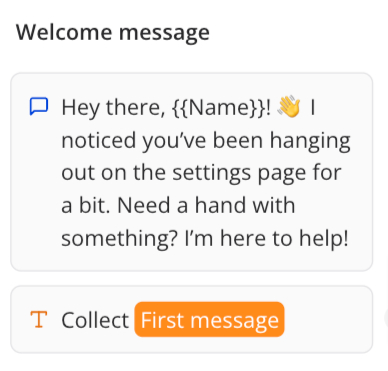
Put a Text bubble:
Hey there, {{Name}}! 👋 I noticed you’ve been hanging out on the settings page for a bit. Need a hand with something? I’m here to help! -
Add a Text Input block the first message. Assign it to a variable. We will then try to deduce the intent using ChatGPT
-
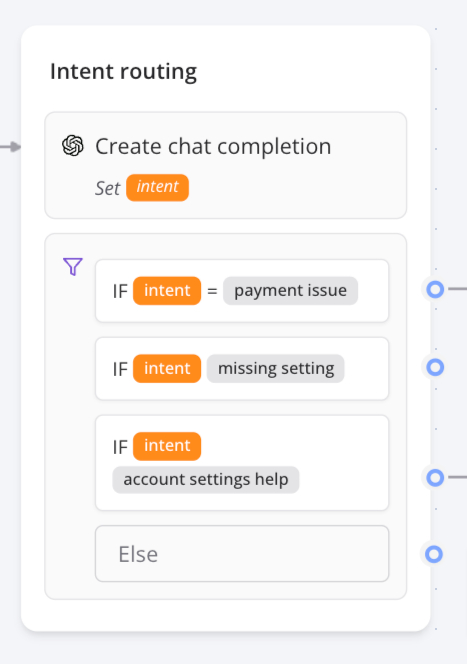
To do that, add a "Create chat completion" block. The prompt should be something like this:
Give me the intent of this user request among these: "account settings help", "payment issue", and "missing setting". This is the user message: {{First message}}. Please return only the intent.\
You can put all the intent ChatGPT suggested.
- Assign the response of ChatGPT in a variable
- Then, we will route each intent to a different path. We will use the "Condition" block, that sould look like this:
Here is the final result:
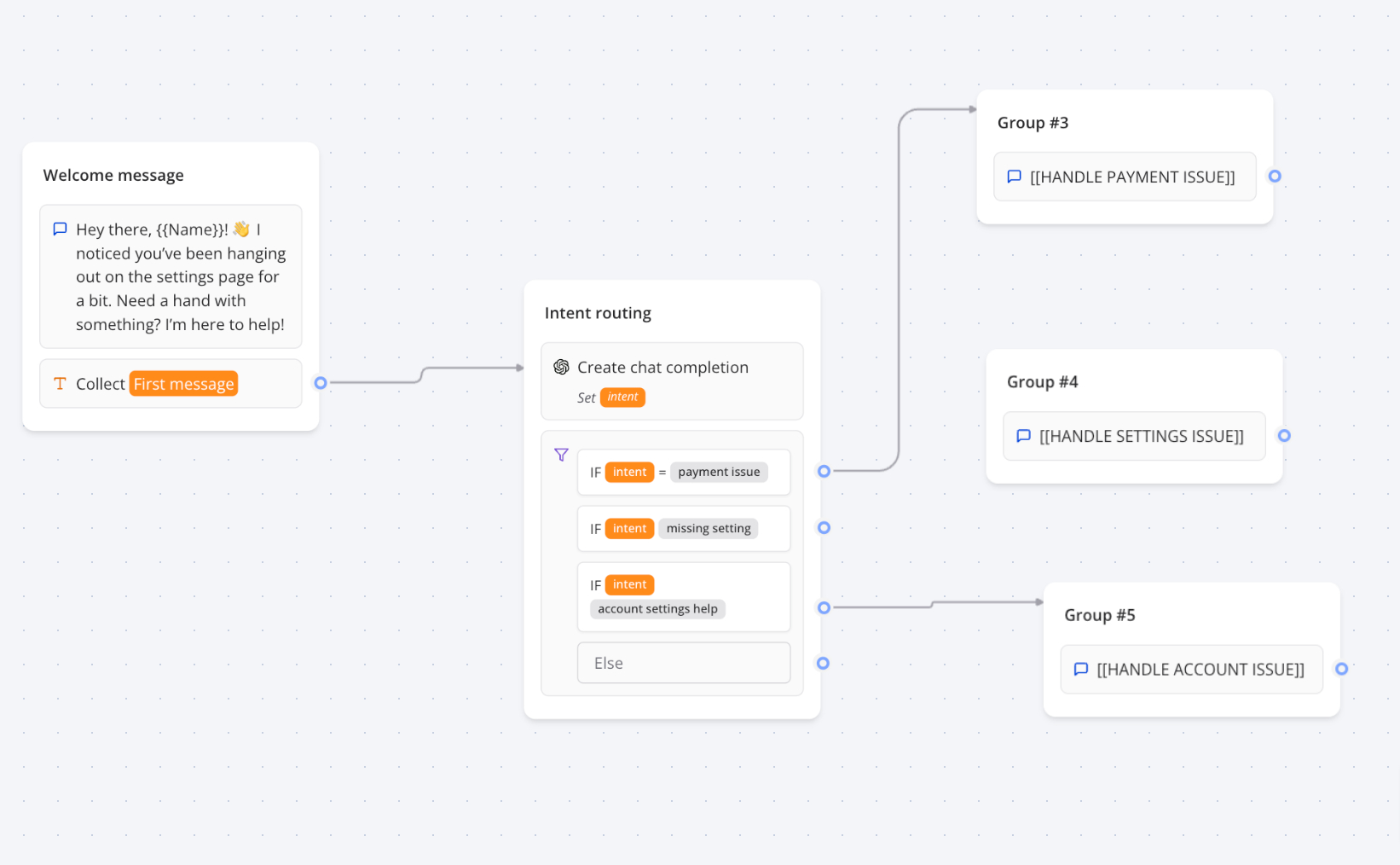
Remember to use variables to personalize the conversation. In this example, we assumed that the web app was passing all the information about the user to the chatbot.
Crafting powerful chatbot scripts requires understanding your audience, clear business objectives, and a touch of creativity.
From sales-boosting conversations to efficient customer support interactions, well-designed scripts can enhance user engagement and drive business results.
By leveraging tools like Typebot and AI assistants, and following best practices for natural, personalized conversations, you can create chatbot experiences that meet user needs and leave a lasting positive impression of your brand.